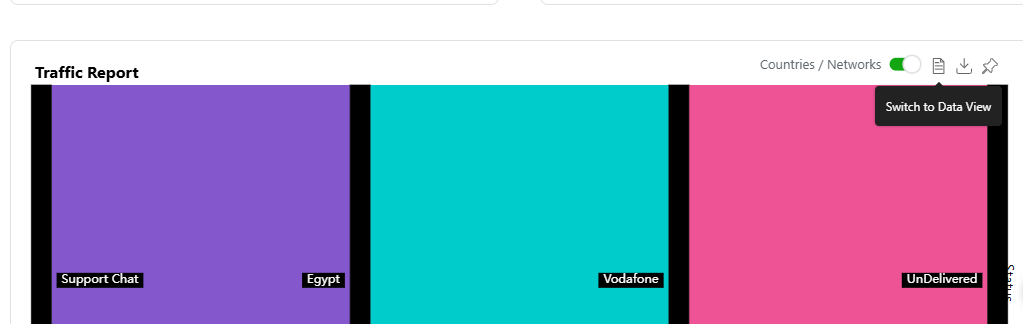
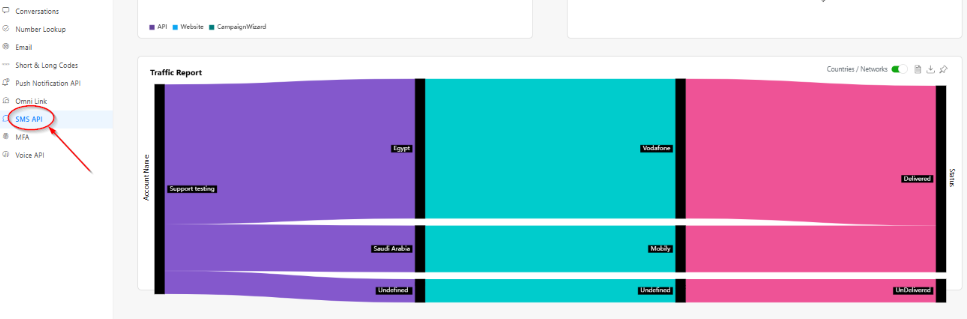
The Traffic Report visual within the Cequens Console offers a comprehensive, flow-based analysis of your SMS traffic performance. This tool helps you visualize the journey of your messages from initiation to final delivery.
Traffic Report Visual Breakdown
Account Name: This initial stage identifies the specific sender account (e.g., Support testing) that is initiating the SMS traffic.
Country: The second column categorizes messages by their destination countries, such as Egypt or Saudi Arabia.
Network: The third column highlights the mobile carriers involved, such as Vodafone or Mobily.
Status: The final column reveals the specific delivery outcome—Delivered for successful arrivals and Undelivered for messages that failed to reach the recipient.
Insights from the Data View
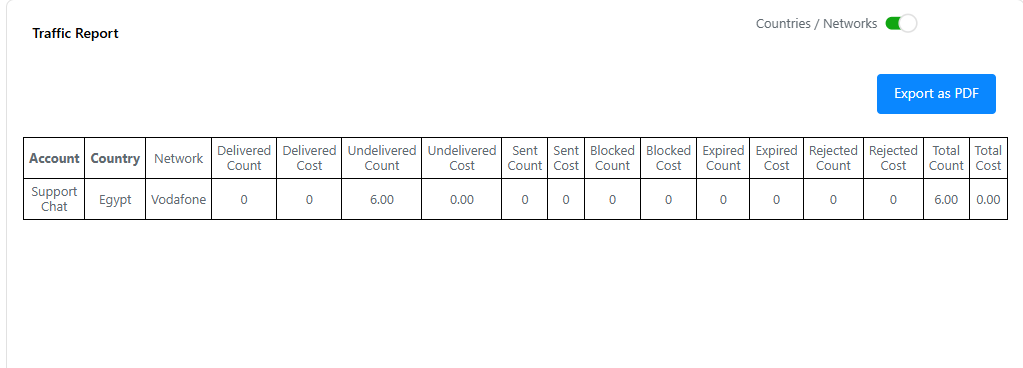
The Data View provides a granular look at your messaging activity and includes several management tools:
Detailed Message Logs: Access comprehensive records for every message, including timestamps, the Sender ID used, partially masked recipient numbers, and the message type (e.g., transactional vs. promotional).
Filtering & Sorting: Tailor your view by filtering data based on date ranges, specific sender IDs, message status, country, or mobile network.
Delivery Metrics Summary: Review high-level summaries that include total sent, delivered, and failed counts, along with your overall percentage-based delivery success rate.
Export Options: For deeper external analysis or reporting, you can export your raw data directly into CSV or Excel formats.